Docker is an advanced OS virtualization software platform that makes it easier to create, deploy, and run applications in a Docker container.
Docker is a container management service. The keywords of Docker are build, ship and run anywhere. The whole idea of Docker is for developers to easily develop applications, ship them into containers which can then be deployed anywhere.
Docker allows the developers to choose the project-specific deployment environment for each project with a different set of tools and application stacks.

Features of Docker
Docker has the ability to reduce the size of development by providing a smaller footprint of the operating system via containers.
With containers, it becomes easier for teams across different units, such as development, QA and Operations to work seamlessly across applications.
You can deploy Docker containers anywhere, on any physical and virtual machines and even on the cloud.
Since Docker containers are pretty lightweight, they are very easily scalable.
The key benefit of Docker is that it allows users to package an application with all of its dependencies into a standardized unit for software development. Unlike virtual machines, containers do not have high overhead and hence enable more efficient usage of the underlying system and resources.
Docker Image:
In Docker, everything is based on Images. An image is a combination of a file system and parameters. Let’s take an example of the following command in Docker.
docker run hello-worldThe Docker command is specific and tells the Docker program on the Operating System that something needs to be done.
The run command is used to mention that we want to create an instance of an image, which is then called a container.
Finally, "hello-world" represents the image from which the container is made.
Docker – Container Lifecycle
The following illustration explains the entire lifecycle of a Docker container.
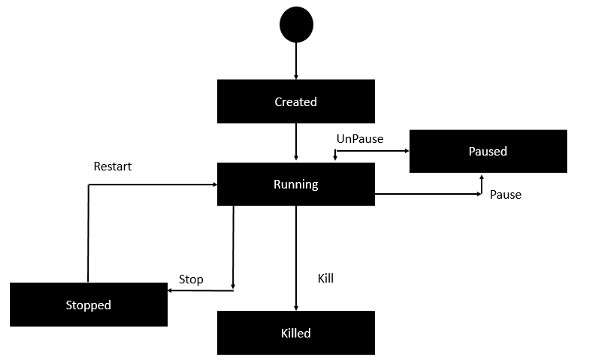
Initially, the Docker container will be in the created state.
Then the Docker container goes into the running state when the Docker run command is used.
The Docker kill command is used to kill an existing Docker container.
The Docker pause command is used to pause an existing Docker container.
The Docker stop command is used to pause an existing Docker container.
The Docker run command is used to put a container back from a stopped state to a running state.
Docker- Architecture:
he following image shows the standard and traditional architecture of virtualization.
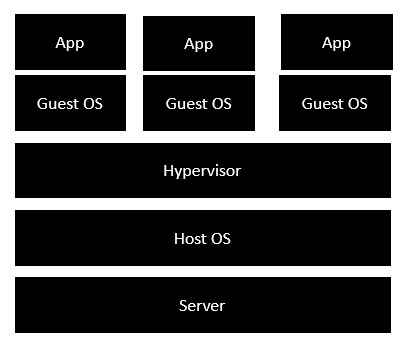
The server is the physical server that is used to host multiple virtual machines.
The Host OS is the base machine such as Linux or Windows.
The Hypervisor is either VMWare or Windows Hyper V that is used to host virtual machines.
You would then install multiple operating systems as virtual machines on top of the existing hypervisor as Guest OS.
You would then host your applications on top of each Guest OS.
The following image shows the new generation of virtualization that is enabled via Dockers. Let’s have a look at the various layers.
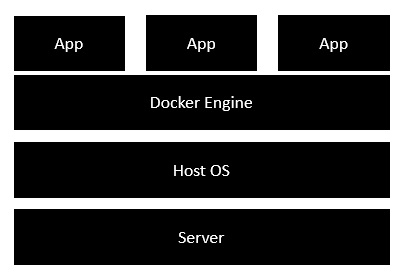
The server is the physical server that is used to host multiple virtual machines. So this layer remains the same.
The Host OS is the base machine such as Linux or Windows. So this layer remains the same.
Now comes the new generation which is the Docker engine. This is used to run the operating system which earlier used to be virtual machines as Docker containers.
All of the Apps now run as Docker containers.
The clear advantage in this architecture is that you don’t need to have extra hardware for Guest OS. Everything works as Docker containers.
Terminology
- Images - The blueprints of our application which form the basis of containers. In the demo above, we used the
docker pullcommand to download the busybox image. - Containers - Created from Docker images and run the actual application. We create a container using
docker runwhich we did using the busybox image that we downloaded. A list of running containers can be seen using thedocker pscommand. - Docker Daemon - The background service running on the host that manages building, running and distributing Docker containers. The daemon is the process that runs in the operating system which clients talk to.
- Docker Client - The command line tool that allows the user to interact with the daemon. More generally, there can be other forms of clients too - such as Kitematic which provide a GUI to the users.
- Docker Hub - A registry of Docker images. You can think of the registry as a directory of all available Docker images. If required, one can host their own Docker registries and can use them for pulling images.
Comments
Post a Comment